
Main content
The SLS member guideKnow where to go.
Know where to go.
Know what you’re seeing.
Find your games, compare the prices you can actually get, and keep your betting record in one place.
New here? Create an account. League access depends on your membership; this guide is open to everyone.
Find the right games first.
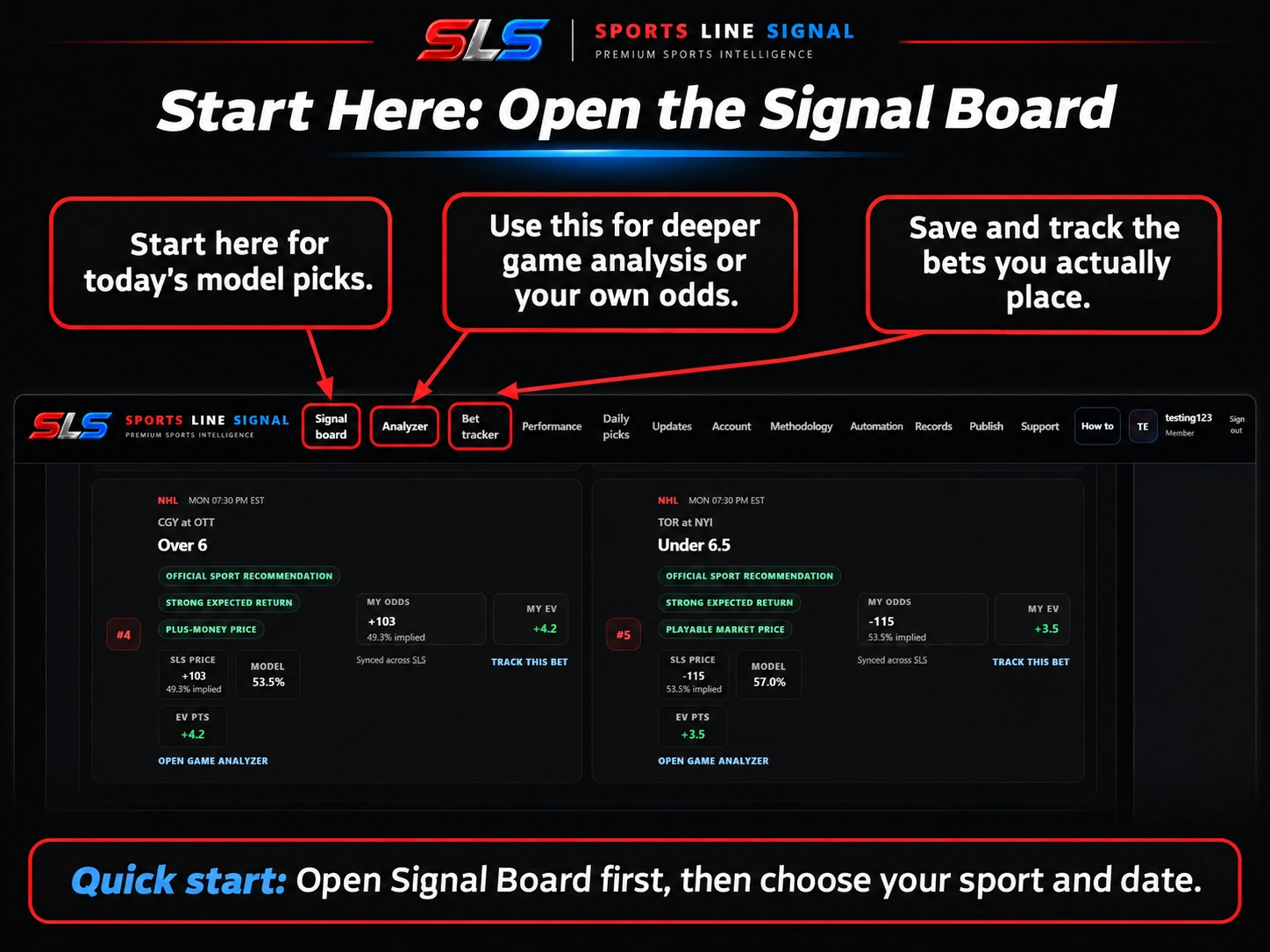
The Signal Board is your starting point for published league boards. Choose a sport tab, then check the date or schedule period shown for that league. Use Today, Tomorrow, or All Upcoming where those controls are available.
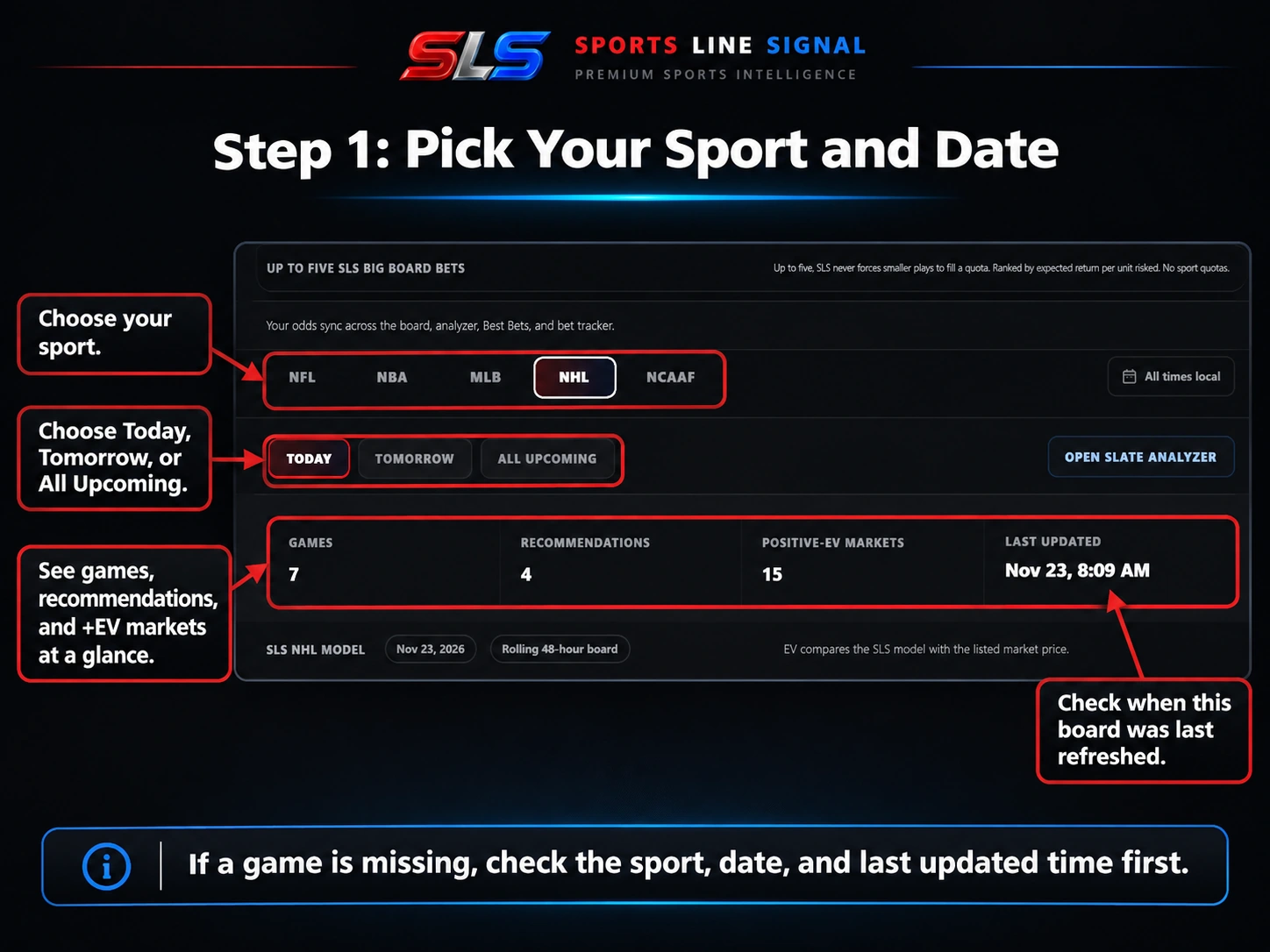
- Check your access. Your membership determines which leagues you can open. A locked league can be managed from Account.
- Check the selected date and “Last updated.” These tell you which board you are viewing. A completed game or a different slate may not appear in the current view.
- Open a matchup. Read its moneyline, spread or run/puck line, and total where available. Select “Open game analyzer” to compare your own prices.
Where does SLS Best Bets fit?
Go to the Signal Board The cross-sport Big Board ranks up to five official recommendations across only the leagues your account can access. It does not replace the full league boards, and fewer than five selections is a valid result.
A label is context. The price still matters.
The matchup label describes the model’s assessment at the published prices. Individual market sides can also show “+EV” or “No +EV”; those are price assessments, not extra recommendation grades.
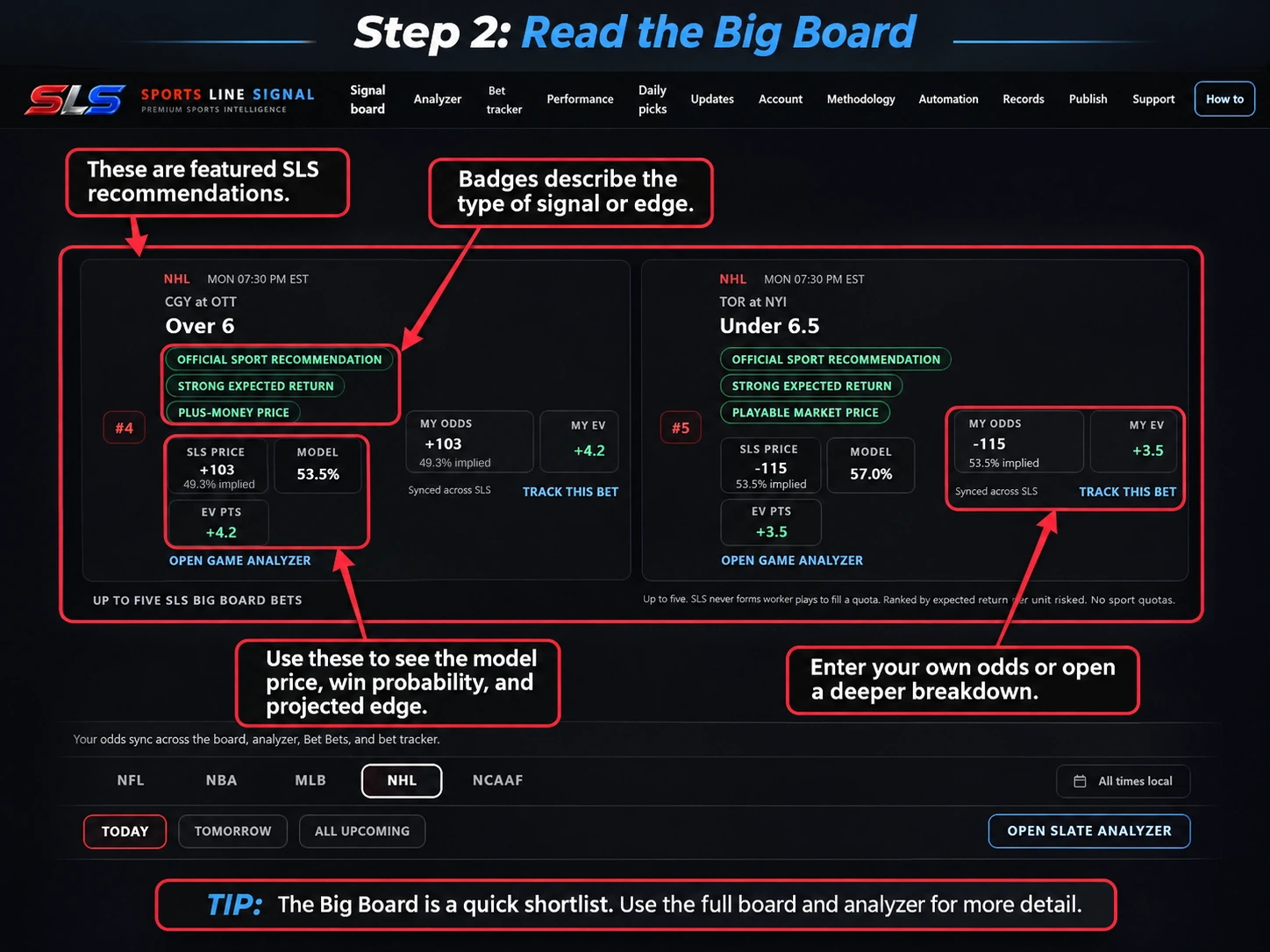
- SLS Recommendation
- An official selection under the SLS recommendation policy. A sport can publish up to five per calendar date, with no more than one from a game. There is no requirement to fill five slots.
- Best Lean
- The strongest qualifying positive-EV selection in a remaining matchup. It is separate from an official SLS Recommendation.
- Slight Lean
- A smaller positive edge identified by the model at the listed price.
- No +EV at current prices
- The current prices do not show a qualifying positive edge. A listed game does not have to produce a bet.
- Signal pending
- The matchup classification is still being prepared.
- Pricing soon
- Complete model pricing for the market is not ready yet.
- Final pregame
- The last scheduled pregame snapshot is locked for tracking and grading. This describes the snapshot, not the likelihood of winning.
Model probability
The model’s estimate of how likely a selection is to win. It is an estimate, not a certainty.
Expected value (EV)
A comparison of model probability with the offered price. Positive EV does not promise that an individual bet wins.
Analyze the line you can actually bet.
Market EV uses the consensus line and odds shown by SLS. My EV uses the line and American odds you save from your sportsbook.
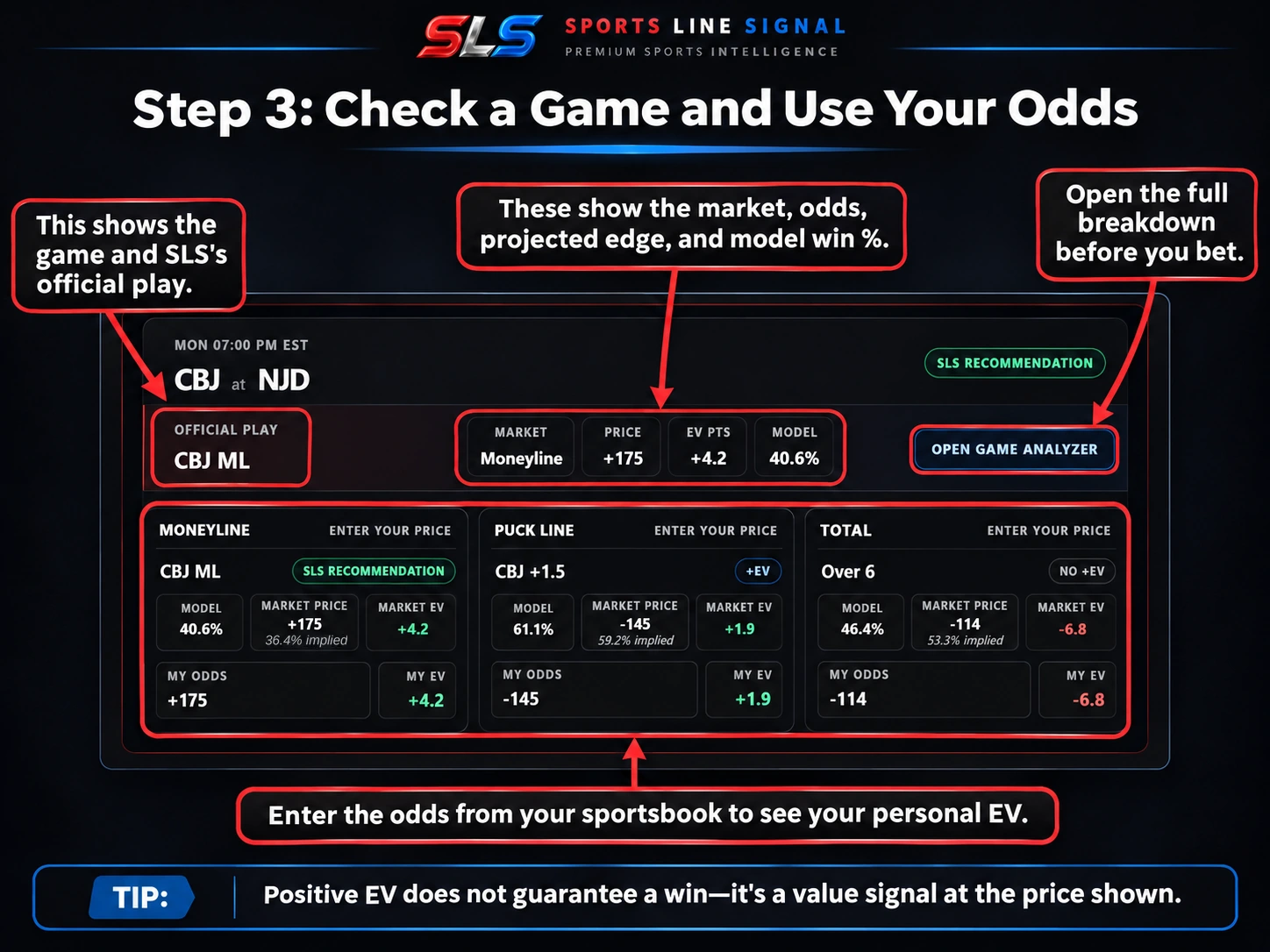
- Open Analyzer, or select “Open game analyzer” on a matchup. Choose the league and either “Single game” or “Full slate.”
- Enter the available moneyline odds, spread or run/puck line and its odds, or total and its Over/Under odds. Check the team, side, and plus/minus signs.
- Select “Save & analyze this game” or “Save & analyze this slate.” Review the recalculated probability and EV.
Changing a price and changing a line are different.
Changing only the odds changes EV. Changing a spread or total can also change the probability. Save and analyze the exact line you intend to use.
Your saved prices are private to your account and sync with the board, analyzer, Best Bets, and tracker handoff. “Reset this game” or “Reset this slate” clears those custom prices so you can return to the market view.
SLS does not connect to your sportsbook or place a wager. Confirm the available line with your sportsbook before betting.
Open the analyzerKeep a record of what you actually bet.
Open Bet tracker and select “Add bet,” or use the tracking action on an SLS signal. Review the event, selection, line, odds, stake, and sportsbook before saving.
- Set your preferences. Use Settings to review your bankroll and unit size. A unit is your chosen reference stake.
- Record the result. Manual entries need their result entered: win, loss, push, or void. Check your sportsbook’s settlement.
- Check settlement eligibility. Eligible premium bets linked to an exact SLS moneyline, spread, or game total can settle automatically from verified final scores. Free-form entries, props, parlays, and futures remain manual.
- Review or export. Use search and filters to find wagers, review your record, or select “Export CSV.” Available analytics depend on your access.
A pending bet has not been settled yet. The tracker records wagers; saving an entry does not place a bet.
Open your trackerKnow which record you’re viewing.
Performance
The published SLS recommendation record. Check the sport, coverage dates, and sample shown. This is separate from your personal tracker.
Daily picks
Published pick posts. Check the date and game details before using a post alongside the current board.
Updates
Product news, model notes, and service announcements from SLS.
Methodology
How SLS approaches its analysis, recommendation policy, and published record.
Manage access in one place.
Open Account to review your membership, league access, and account details.
- Manage Membership: review available plan or league changes and when they take effect.
- Manage Billing: review billing and cancellation options.
- Before confirming a change: read the price, renewal or trial date, and effective date displayed for your account.
If you have more than one email address, make sure you signed in with the account used for your membership. The FAQ and Billing & cancellation policy explain the available options in more detail.
Open your accountIf something doesn’t look right.
I can’t see a game or league.
Check the selected league, date or period, and any active filters. Then check your league access in Account. Read the board’s last update and any availability message; an empty view is not proof that no games are scheduled.
The board says “Pricing soon” or “Signal pending.”
The displayed model pricing or classification is not ready. Check again later and review Updates for service notices. If a game is approaching and the message persists, contact support with the league, matchup, and date.
My price or EV looks different from the market.
Check for saved sportsbook prices. Compare the exact team, side, line, and odds, then save and analyze again if you changed them. Use the analyzer’s reset action if you want to clear your custom prices.
A page says “temporarily unavailable.”
Reload the page once and check Updates. If the issue continues, send support the page name, league, approximate time, and a screenshot. Do not include passwords, payment details, or private access keys.
A finished bet is still pending.
Check whether the tracker entry uses automatic settlement or needs a manual result. Automatic settlement depends on a verified final result and an exact supported event link. For an eligible entry that remains pending, contact support with the matchup and date.
Need a hand?
Tell us where you got stuck and which game or page you were viewing.
SLS provides analysis, not guaranteed outcomes. Only wager what you can afford to lose. Responsible gaming resources.